At the time, this was considered standard Drupal practice. Every article had a separate “featured image” field, completely independent from the article body itself.
But over the years my publishing workflow changed.
Instead of treating images as metadata attached to content, I started using them more naturally inside the article body itself. Rather than uploading a featured image separately and then inserting additional images into the text, I simply placed the main image directly where it belonged in the article. This is how modern publishing platforms work today. Platforms like Substack, Medium, Ghost, and LinkedIn Articles all assume the content itself defines the visual structure of the article.
Drupal, however, still expected that separate image field.
And that slowly became annoying.
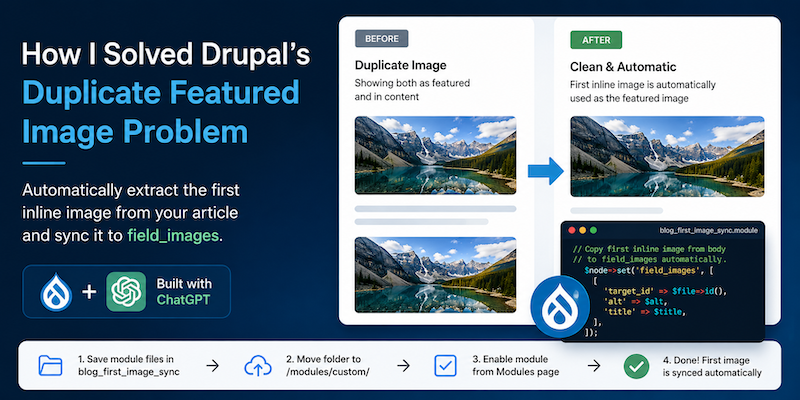
The same image would often appear twice: once at the top of the article as the featured image, and then again inside the article content where I actually wanted readers to see it. On category pages and social previews the featured image still served an important role, but on the article page itself it created duplication and clutter.
For a while I handled this with display settings. I simply hid the featured image field from full article view modes while continuing to display it in teasers, taxonomy pages, and OpenGraph metadata. Technically it worked, but editorially it still felt outdated because every article required uploading the same image twice — once into the image field and once into the content itself.
The Real Goal
What I really wanted was a more modern publishing workflow.
If an article already contains an inline image, especially the first image in the content, Drupal should automatically understand that this is the article’s primary image. That image should then automatically become available everywhere else across the site — teasers, social previews, OpenGraph metadata, category listings, homepage cards, and Views.
In other words, insert the image once and let the system handle the rest automatically.
Building the Solution
At first I assumed there must already be a Drupal module that solved this elegantly. There are several related modules and approaches, but none behaved exactly the way I wanted. Some relied heavily on Media fields, others required complicated template overrides, and a few simply didn’t work reliably with inline CKEditor content. In some cases the extracted image URLs created issues with OpenGraph integration or failed in certain rendering contexts.
So I started debugging and experimenting with my own solution.
The main challenge was extracting inline images cleanly and reliably from rendered article content while keeping compatibility with the rest of the Drupal ecosystem. I needed something lightweight that would not disrupt existing workflows or require rebuilding content structures that had existed for over a decade.
This is where ChatGPT became surprisingly useful.
Instead of spending hours jumping between Drupal API documentation, forum posts, StackOverflow answers, and old Drupal.org issues, I approached the process conversationally. I described the exact workflow problem, tested different implementation ideas, debugged hook behavior, explored render arrays, and refined the logic step by step together with AI assistance.
What people now call “vibe coding” actually turned out to be remarkably effective for this kind of practical problem-solving.
The Module
Here is the module.
Create blog_first_image_sync.info.yml
name: Blog First Image Synctype: moduledescription: 'Copies the first inline body image into field_images for blog nodes.'package: Customcore_version_requirement: ^10 || ^11dependencies: - drupal:node - drupal:file - drupal:image
And create blog_first_image_sync.module
<?phpdeclare(strict_types=1);use Drupal\node\NodeInterface;/*** Implements hook_node_presave().*/function blog_first_image_sync_node_presave(NodeInterface $node): void { \Drupal::logger('blog_first_image_sync')->notice('Presave fired for node @nid type @type', [ '@nid' => $node->id() ?? 'new', '@type' => $node->bundle(), ]); if (!$node->hasField('body') || !$node->hasField('field_images')) { \Drupal::logger('blog_first_image_sync')->error('Missing required field(s). body: @body field_images: @images', [ '@body' => $node->hasField('body') ? 'yes' : 'no', '@images' => $node->hasField('field_images') ? 'yes' : 'no', ]); return; } if ($node->get('body')->isEmpty()) { \Drupal::logger('blog_first_image_sync')->notice('Skipping: body empty'); return; } $html = (string) $node->get('body')->value; \Drupal::logger('blog_first_image_sync')->notice('Body length: @len', [ '@len' => strlen($html), ]); if (trim($html) === '') { \Drupal::logger('blog_first_image_sync')->notice('Skipping: body blank after trim'); return; } libxml_use_internal_errors(TRUE); $dom = new \DOMDocument(); $loaded = $dom->loadHTML('<?xml encoding="utf-8" ?><html><body>' . $html . '</body></html>'); libxml_clear_errors(); if (!$loaded) { \Drupal::logger('blog_first_image_sync')->error('DOM loadHTML failed'); return; } $xpath = new \DOMXPath($dom); $nodes = $xpath->query('//img[@data-entity-type="file" and @data-entity-uuid]'); \Drupal::logger('blog_first_image_sync')->notice('Matched inline images: @count', [ '@count' => $nodes ? $nodes->length : 0, ]); if (!$nodes || $nodes->length === 0) { \Drupal::logger('blog_first_image_sync')->warning('No matching inline image found in body'); return; } $first_image = $nodes->item(0); $uuid = $first_image->getAttribute('data-entity-uuid'); \Drupal::logger('blog_first_image_sync')->notice('Found UUID: @uuid', [ '@uuid' => $uuid, ]); if ($uuid === '') { \Drupal::logger('blog_first_image_sync')->warning('UUID attribute empty'); return; } $entity_repository = \Drupal::service('entity.repository'); $file = $entity_repository->loadEntityByUuid('file', $uuid); if (!$file) { \Drupal::logger('blog_first_image_sync')->error('Could not load file entity by UUID @uuid', [ '@uuid' => $uuid, ]); return; } \Drupal::logger('blog_first_image_sync')->notice('Loaded file @fid uri @uri', [ '@fid' => $file->id(), '@uri' => $file->getFileUri(), ]); $alt = $first_image->getAttribute('alt') ?: ''; $title = $first_image->getAttribute('title') ?: ''; $node->set('field_images', [ [ 'target_id' => $file->id(), 'alt' => $alt, 'title' => $title, ], ]); \Drupal::logger('blog_first_image_sync')->notice('field_images set to file ID @fid', [ '@fid' => $file->id(), ]);}
Installation
Save both files inside a folder called blog_first_image_sync, then move that folder into your Drupal /modules/custom/ directory.
After that:
- Go to the Drupal admin Modules page
- Enable
Blog First Image Sync - Clear Drupal cache
Before enabling the module, make sure that field_images is actually the image field used in your content type. The module expects this exact machine name when saving the extracted image.
How It Works
The module automatically extracts the first inline image found inside the article body and saves it into the field_images field for you.
That means you no longer need to:
- upload the image separately as a featured image
- maintain duplicate image fields
- manually sync article visuals
Once the image is synced into field_images, Drupal can continue using it normally everywhere else across the site:
- teasers
- Views
- taxonomy/category pages
- homepage article listings
- OpenGraph metadata
- Facebook previews
- Twitter/X cards
To make this work properly, keep the field_images field visible in teaser displays, Views, cards, and social metadata integrations. On full article pages you can safely hide the field display to avoid duplicate images appearing both inside the content and above the article.
Final Thoughts
The final result is a much cleaner editorial workflow that behaves more like modern publishing platforms such as Substack or Medium: insert the image once directly into the article, and let the system handle the rest automatically.
AI did not magically generate a perfect solution in one prompt. That’s not how real development works. But it dramatically accelerated experimentation and debugging. Instead of searching for isolated technical answers, I could iteratively explore the problem itself. That reduced friction between idea and implementation in a way that genuinely changed the development experience.
In many ways, this small module reflects a broader shift happening in software development right now. Small workflow annoyances that once stayed unsolved for years suddenly become worth fixing because the cost of experimentation has dropped so much.
And honestly, this particular annoyance had been bothering me for a very long time.
Now the publishing workflow finally feels modern. I insert an image once directly into the article where it belongs, publish the content, and everything else is handled automatically behind the scenes.
Exactly how it should have worked all along.